Is CollarID right for your study?
The questions researchers ask us before a pilot, answered with the numbers we plan with. If your species or site sits near one of the limits below, write to us before you order and we will work through it with you.
- Is it light enough for my animal?
- How will it mount on a collar band?
- How long will it run, and how much sun does it need?
- How well does GPS work under forest canopy?
- Which data can I get without catching the animal?
- How much audio fits on a card?
- What do I need for a gateway? with how to install your own
- How do I get the collar back?
- Are audio, movement and GPS on the same clock?
- What can the microphone do?
- How hot, cold and wet can it get?
- Can I reuse collars between deployments?
- What are the specifications?
Is it light enough for my animal?
The device weighs 150 g before the band. It was designed for medium to large mammals. A common guideline keeps a collar under roughly 3 to 5 % of the animal’s body mass, which for 150 g works out as:
| Guideline | Smallest animal |
|---|---|
| 5 % of body mass | 3.0 kg |
| 3 % of body mass | 5.0 kg |
Add the mass of your band, fasteners and any release mechanism before you compare. Your permitting body’s threshold is the one that counts, and some species need a stricter limit than either figure.
The solar panel sits on top of the housing, so mount the collar with the panel facing up and clear of fur or a mane where you can. The more light reaches it, the longer the collar runs. See how it mounts to a band before choosing your band stock.
How will it mount on a collar band?
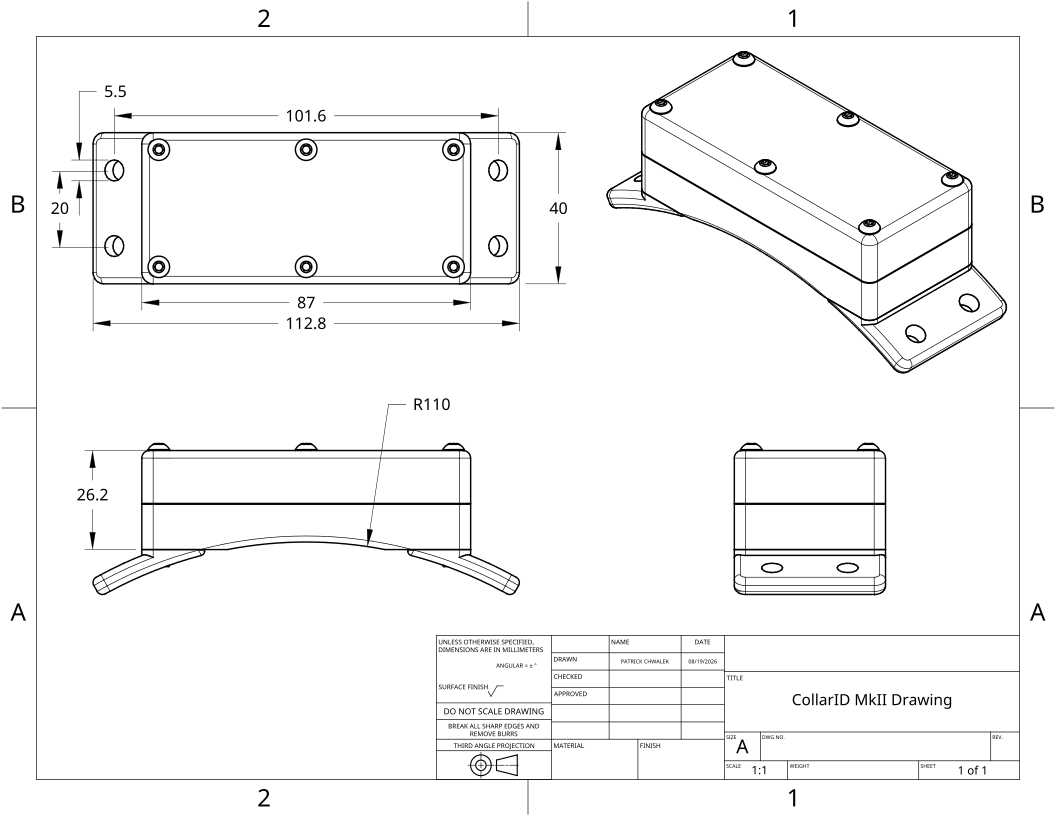
You supply a band suited to your species. The CollarID housing mounts on the outside of it, with the solar panel facing up. Include the band and any release mechanism when checking the collar's total mass and fit.
CollarID Mk II: 150 g; 112.8 × 40 mm across the housing and mounting tabs; 26.2 mm high with the cover fitted. The mounting feet sit on the outside of the band.
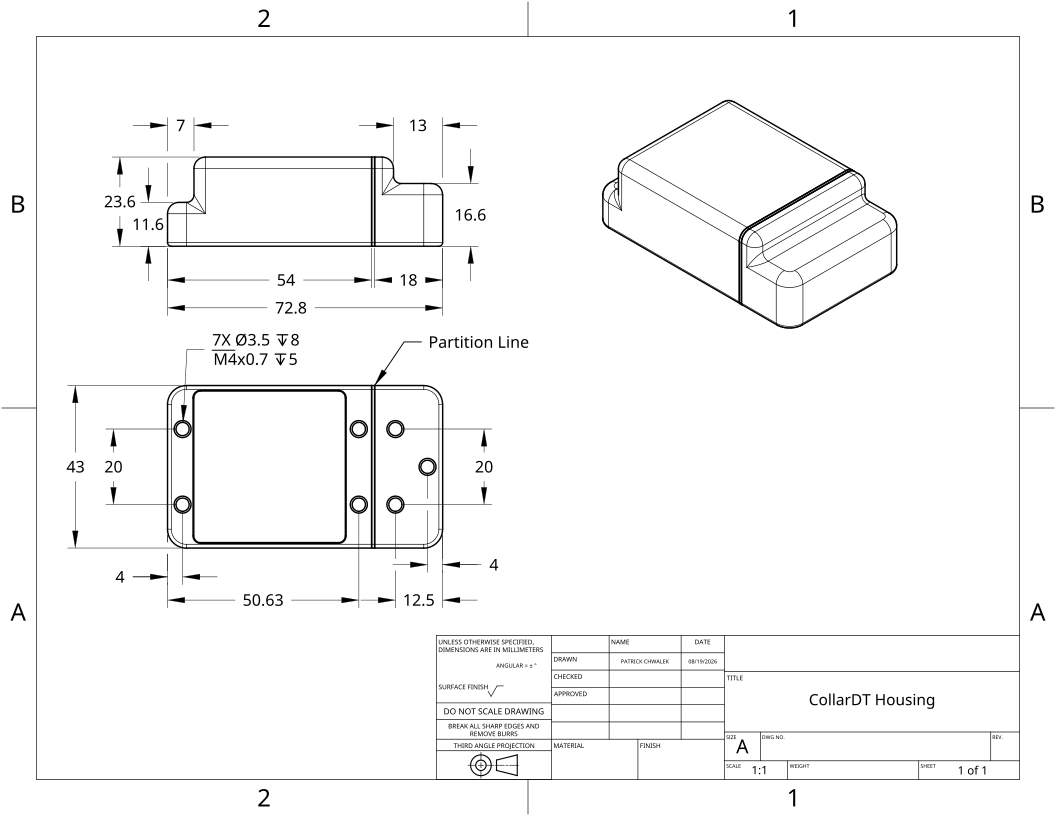
CollarDT, in pilot: 135 g; 72.8 × 43 mm; 23.6 mm at its tallest point. It replaces a section of the band. With a CollarID Mk II, the two devices weigh 285 g before the band and fasteners.
Band width, thickness and fastener length depend on the band you choose. Follow your approved animal-handling and species-specific fitting protocol when fitting a collar to an animal, and plan how it will release or be recovered before deployment. For an unusual band or species, ask the CollarID team about compatibility.
How long will it run, and how much sun does it need?
It depends on the schedule, and mostly on how much of the day the microphone records. Here is one realistic configuration, run through the same power model the configurator uses:
- GPS fix every 30 minutes
- Microphone recording half the time (5 minutes in every 10)
- Accelerometer at 25 Hz, continuously
- Light, temperature, humidity and pressure on
- LoRaWAN uplink every 4 hours
| Audio setting | Battery only | Direct sun to run indefinitely | Open shade to run indefinitely |
|---|---|---|---|
| 16 kHz, compressed (default) | ≈ 23 days | 0.7 h / day | 4.9 h / day |
| 16 kHz, uncompressed | ≈ 22 days | 0.8 h / day | 5.1 h / day |
| 8 kHz, compressed | ≈ 25 days | 0.7 h / day | 4.6 h / day |
| No audio, everything else the same | ≈ 72 days | 0.25 h / day | 1.6 h / day |
Under closed canopy the panel gets roughly a third of the light it gets in open shade. With audio at half the time, that means about 14 to 15 hours a day under dense cover, which no forest day provides. So a collar that spends most of its time under canopy will run on its battery with solar topping it up. Record audio for a smaller part of the day, or give it sunny resting spots, and the numbers move quickly in your favor.
If the battery runs low, the collar does not die. At about 10 % charge it hibernates, checks the battery every 8 hours, and resumes recording on its own above 20 %. A collar that goes quiet during a cloudy week usually comes back when the sun does.
How well does GPS work under forest canopy?
In open sky the receiver is accurate to about 1.5 m. Under canopy, expect fewer successful fixes, longer searches and wider error. We don’t yet have field numbers from closed forest, so treat the first deployment at a forest site as the measurement.
A few things work in your favor:
- Every fix carries its own accuracy estimate and the time it took, both on the SD card and over LoRaWAN, so you can filter poor fixes out afterwards instead of guessing.
- Each attempt is time-limited. If the collar can’t get a fix, it stops searching and tries again at the next scheduled fix. An animal resting under thick cover costs a missed fix, not a flat battery.
- It adapts to a run of failures. When fixes keep failing, the collar adjusts how it tries, to save battery, and returns to your schedule after the next good fix.
- GPS is a small part of the power budget at a 30-minute interval. Even if every fix took twice as long under canopy, the example configuration in the runtime section would use less than 10 % more power.
An accuracy setting in the configurator trades precision against search time. A looser setting accepts a fix sooner, which helps under canopy.
Which data can I get without catching the animal?
Small readings travel by radio. Audio and movement recordings are far too large for these links, so they stay on the SD card until you have the collar in hand.
| Data | Over the air | SD card |
|---|---|---|
| GPS locations | Yes | Yes |
| Temperature, humidity, pressure, light | Yes | Yes |
| Battery and collar health | Yes | Yes |
| Audio recordings | No | Yes |
| Raw accelerometer | No | Yes |
The radio link is LoRaWAN, received by a gateway you install within range of your study animals. Readings appear on the live map in your CollarID dashboard, and you can change the recording schedule over the same link without handling the animal. Each collar also keeps about a month of its own transmissions, so a gateway outage does not cost you data. Where a fixed gateway isn’t practical, a handheld receiver can pick up the collar’s transmissions as you walk the site; this is still in pilot with collaborators.
How much audio fits on a card?
More than the battery can record, in most setups. Recording every minute of the day:
| Audio setting | Per day | 256 GB card | 1 TB card |
|---|---|---|---|
| 16 kHz, uncompressed | 2.8 GB | ≈ 90 days | ≈ 1 year |
| 16 kHz, compressed | 0.9 GB | ≈ 9 months | ≈ 3 years |
| 8 kHz, uncompressed | 1.4 GB | ≈ 6 months | ≈ 2 years |
| 8 kHz, compressed | 0.5 GB | ≈ 18 months | ≈ 6 years |
Recording half the time doubles these. Compression is lossless: you get back exactly the samples the microphone recorded. How small the files get depends on the site. We plan with 3 to 1, and quiet sites do better, while constant insect or rain noise does worse. Accelerometer and sensor data add well under 1 % to the totals. Higher sample rates for ultrasonic work fill a card proportionally faster: 192 kHz uses twelve times the space of 16 kHz.
We recommend the Kioxia Exceria Plus, which gave the best power and stability in our testing. Cards up to 2 TB are tested. The SanDisk High Endurance 128 GB is approved as a lower-cost alternative, at about a third more battery while recording. The SanDisk Extreme and Extreme Pro have passed the same endurance testing and sit in the same range once the next firmware is out; until then they cost about twice the battery while recording. Once you have collars, the configurator estimates how long your exact schedule takes to fill a card.
What do I need for a gateway?
One LoRaWAN gateway within radio range of the areas your animals use, pointed at a network server. We host a server free for small-scale testing, and if your institution already runs its own ChirpStack server, collars can report through that instead. The collar supports the US915, EU868 and AU915 frequency plans; pick the one that is legal where you work.
For our own deployments we use a low-cost, off-the-shelf gateway with an outdoor omnidirectional antenna and a lightning arrestor. The gateway itself is an indoor unit, so outdoors it goes in a weather-tight enclosure with the antenna mounted outside. It needs power and an internet connection to pass readings on to the dashboard. LoRa reaches several kilometres over open ground and much less through dense, wet forest and hills, so mount the antenna as high as you can: a ridge, tower or tall tree makes the biggest difference.
Installing your own gateway
You supply a gateway and an antenna, point the gateway at the CollarID server, and send us the gateway’s ID. From then on your collars’ reports arrive in your account. This is what we use ourselves:
- Gateway: the SenseCAP Multi-Platform LoRaWAN Gateway (SX1302), for its low cost and ease of use. Order the version for your region, US915 or EU868. They are not interchangeable. Write to us before setting up an AU915 gateway.
- Antenna: an outdoor omnidirectional antenna with a lightning arrestor, matched to the same region. Many equivalent models exist, such as this RAIGEN omnidirectional outdoor antenna with lightning arrestor.
- Enclosure: the SenseCAP is an indoor gateway. Outdoors, house it in a weather-tight enclosure or inside a building, with the antenna cable led outside and the antenna in clear view of the sky.
- Power and internet where the gateway sits.
Pointing the gateway at the CollarID server
On a SenseCAP gateway:
- Log in to the gateway’s console.
- Select LoRa → LoRaNetwork.
- Open General Settings. Set the Server Address to
chirpstack.collarid.organd the Server Port for your region:1700for EU868,1701for US915. Enter the same port in both the up and down fields. - Leave the EUI as it is, and send it to [email protected] so we can register your gateway on the network.
The free CollarID server is meant for small-scale testing. For a larger or long-term deployment, write to us and we will work out the options. When your collars report through the CollarID server, the CollarID team can also see their locations and sensor readings. That does not include audio or accelerometer recordings. It is used only for diagnostics and troubleshooting and is never shared with anyone else.
If you already run your own ChirpStack server
Your collars can stay registered on your own server and still work fully with CollarID, including changing schedules remotely. We connect the two servers for you. It takes about five minutes in your ChirpStack console to collect what we need:
- Your ChirpStack web address: the URL you log in at.
- Your Tenant ID: the long code after
/tenants/in the address bar once you are logged in. - An API key: Tenant → API Keys → Add API key, named “CollarID”. Copy the key straight away; it is shown only once.
- Your radio region: usually US915 in North America, EU868 in Europe and most of Africa.
Your ChirpStack server must be reachable from the internet: if you can log in to it from home without a VPN, it qualifies. You can revoke the API key at any time. Collars on your own server are heard only by your own gateways, while collars on the CollarID server are heard by every gateway on the shared network.
If you have an account, the same steps with a screenshot of the gateway’s console are in the manual under Your own LoRaWAN gateway.
How do I get the collar back?
Because the recordings live on the card, plan the recovery before you deploy. There are two routes that avoid a second capture:
- A passive release. A degradable cotton or polymer spacer in the band parts after a period of weather. It adds almost no weight. Release timing varies with conditions, and warm, humid sites break it down faster, so calibrate it for your site.
- CollarDT, our detachment module, releases the collar at a time you set. It is in pilot and adds 135 g, so it suits larger animals.
Either way, the last GPS fixes the collar sent over LoRaWAN tell you where to look for it on the ground.
Are audio, movement and GPS on the same clock?
Yes. Every stream is timestamped in UTC from one clock inside the collar, and that clock is corrected from GPS time throughout the deployment, so it does not drift away over weeks. Each audio file also records the sample rate the microphone actually ran at, so long recordings line up with the accelerometer and GPS without stretching. The file formats are fully documented for account holders.
What can the microphone do?
Recording can run continuously, on a schedule (for example 2 minutes in every 10), or only at certain hours, on certain days, or between dates. Sampling runs from 8 kHz up to 192 kHz for ultrasonic work, in lossless compressed files (the default) or uncompressed WAV. The figures are in the specifications below.
How hot, cold and wet can it get?
- Temperature: operates from −20 °C to +60 °C.
- Rain and splashing: the housing is gasket-sealed and came through repeated pressurized hot-water spray testing with no water getting in. The microphone and air-sensor port is open to sound and air but mechanically protected.
- Swimming and wallowing: the housing has been tested through heavy rain, but not underwater, and it does not have a formal waterproof rating yet (certification is planned). We can’t guarantee long-term operation for animals that regularly swim or submerge. If that is part of your species’ routine, talk to us before you deploy.
The seal holds only if the gasket is clean and the cover is closed evenly. The manual walks through it.
Can I reuse collars between deployments?
Yes. Once a collar is back, open it, copy the SD card, recharge it over USB-C and load the next schedule. Firmware updates go over Bluetooth with the cover on. Check the gasket each time: replace it if it is dirty or cut, otherwise it can be reused.
- Battery life: the battery is a rechargeable lithium-polymer cell. Like any lithium battery it slowly loses capacity with age and use, but the shallow daily top-ups from the solar panel are gentle on it, and it should last several seasons of deployments. Heat and long storage at full charge age it fastest. Between deployments, store collars somewhere cool at around half charge, top them up every few months, and charge fully just before you deploy. A cell that swells or no longer holds a charge should be replaced.
- Refurbishing: we offer refurbishment between deployments, arranged case by case. Get in touch when your collars come back.
- The band: bands are not included; you supply the band that suits your species. See the dimensions and drawings while planning.
What are the specifications?
The figures for the CollarID Mk II, the current production hardware, in one place.
| Physical | |
|---|---|
| Weight | 150 g, before the band |
| Size | 112.8 × 40 × 26.2 mm with the cover fitted, including the mounting tabs at each end; 87 mm across the body alone |
| Housing | Polycarbonate cover on a machined, anodized aluminum base, sealed by a gasket and six stainless screws |
| Mounting | Four Ø5.5 mm slots, two at each end, either 20 mm or 30 mm apart across the band depending on the version of the collar; outer centres 101.6 mm (4 in) apart. The drawing shows the 20 mm version |
| Temperature | Operating −20 to +60 °C; storage −40 to +85 °C |
| Water | Sealed against rain and pressurized spray; no formal waterproof rating yet. See how wet it can get |
| Power | |
| Battery | Rechargeable lithium, 2.96 Wh |
| Charging | Solar panel on the housing; USB-C in about 2 hours |
| Low battery | Hibernates at 10 % charge, checks every 8 hours and resumes above 20 % |
| Location | |
| Satellites | GPS, GLONASS, Galileo and BeiDou |
| Accuracy | 1.5 m or better in open sky (CEP) |
| Time to a fix | 30 s or less from a cold start under clear sky; under 5 s from a hot start |
| Radio | |
| LoRaWAN | US915, EU868 or AU915, set per collar; Class A, OTAA or ABP |
| LoRa settings | SF7 to SF12; 125, 250 or 500 kHz; coding rate 4/5 to 4/8 |
| Bluetooth | Bluetooth Low Energy 5, for setting schedules and updating firmware from a browser |
| Sensors | |
| Microphone | Digital MEMS, 100 Hz to 80 kHz response |
| Audio | 8, 16, 48, 96 or 192 kHz; 8- or 16-bit mono; lossless FLAC (the default) or WAV |
| Accelerometer | 3-axis; ±2 (default), ±4 or ±8 g; 25 Hz (default) or 50 Hz; 12-bit |
| Magnetometer | 3-axis, one reading a minute |
| Air | Temperature, humidity, pressure (300 to 1100 hPa) and gas/VOC |
| Particulates | PM1.0, PM2.5 and PM10. Not included in the base configuration; available on request |
| Light | Ambient light, logged as raw counts |
| Storage | |
| Card | microSD, exFAT, tested to 2 TB. See how much fits on a card |
Certification: end-product certification is in progress, and FCC, IC and CE are still to come. Devices are provided for research use only.
If you have an account, the full datasheet adds the firmware features and the CollarDT detachment module.